Showing posts with label matched rows from two dataframes in python. Show all posts

Thursday, September 16, 2021

Python — A Tool for Everything

Data is a tool, an asset for making a better decisions which can be act as a supreme driver of business value. Now a days, Python is one of the fastest growing programming languages. With the help of this programming language, we can easily do the followings —

  1. Data manipulation with Pandas, 
  2. Creating fabulous visualizations with Seaborn, or
  3. Scaling Analytics, Deep Learning and AI Data model with TensorFlow,
Python — A Tool for Everything

So, we can trust on the Python language which seems to have a tool for everything.

In the current era, the volumes of data generated continue to grow at a rapid pace across structured, semi structured, and unstructured data types that businesses are now able to store and need to analyze. 
Few years back, Cloud Technology was considered an optional technology environment but now a days, it is the foundation for modernizing data management and most of the organizations use cloud services or infrastructure widely in their data architecture.

Pandas Library

Pandas is a Python package that provides fast, flexible, and expressive data structures designed to make working with structured like tabular, multidimensional, potentially heterogeneous and time series data both easy and intuitive. It aims to be the fundamental high-level building block for doing practical, real world data analysis in Python.

OS comes under Python’s standard utility modules. This module provides a portable way of using operating system-dependent functionality. os.listdir(‘your_path’) will list all content of a directory

NumPy is a library for the Python programming language, adding support for large, multi-dimensional arrays and matrices, along with a large collection of high-level mathematical functions to operate on these arrays.

SQLite3 can be integrated with Python using sqlite3 module, which provides an SQL interface compliant with the DB-API 2.0 specification described by PEP 249. You do not need to install this module separately because it is shipped by default along with Python version 2.5.x onwards.


Seaborn is a Python data visualization library based on matplotlib. It will be used to visualize random distributions and provides a high-level interface for drawing attractive and informative statistical graphics.

Matplotlib is a comprehensive library for creating static, animated, and interactive visualizations in Python, and its numerical mathematics extension NumPy. It provides an object-oriented API for embedding plots into applications using general-purpose GUI toolkits like Tkinter, wxPython, Qt, or GTK.

TensorFlow is a free and open-source software library for machine learning and artificial intelligence. It is an end-to-end open source machine learning platform for everyone and can be used across a range of tasks but has a particular focus on training and inference of deep neural networks. TensorFlow is a symbolic math library based on dataflow and differentiable programming. 
Note: 
1.
Seaborn supports Python 3.7+ and no longer supports Python 2.
2. TensorFlow now supports Python 3.5.x through Python 3.8.x, but you still have to use a 64-bit version.

To learn more, please follow us -
http://www.sql-datatools.com

To Learn more, please visit our YouTube channel at —
http://www.youtube.com/c/Sql-datatools

To Learn more, please visit our Instagram account at -
https://www.instagram.com/asp.mukesh/

To Learn more, please visit our twitter account at -
https://twitter.com/macxima


Wednesday, November 18, 2020

Python — How to update multiple columns at once in dataframe?


W
orking as Python developer, data analysts or data scientists for any organisation then it is very important for you to know how to play with Dataframes. 


We understand, we can add multiple columns to a dataframe and update its values to the values returned from a function or other dataframe column’s values.


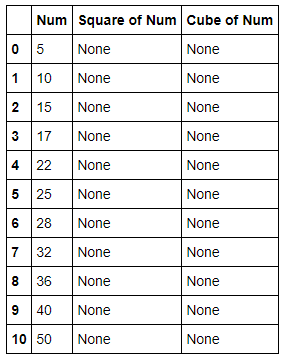
 Steps to be followed are as given below -

Problem — The actual function is returning two items, and I want to put these two items in two different new columns.

How to update multiple columns in Dataframe? If you want to update multiple columns in dataframe then you should make sure that these columns must be present in your dataframe. In case, updated columns are not in your dataframe, you have to create them as given below -

With the help of Pseudo code technique, we can update multiple columns at once. Pseudo code is a term which is often used in programming and algorithm based fields. It is a methodology that allows the programmer to represent the implementation of an algorithm.

Advantages of Pseudocode

  • Improves the readability of any approach. It’s one of the best approaches to start implementation of an algorithm.
  • Acts as a bridge between the program and the algorithm or flowchart. Also works as a rough documentation, so the program of one developer can be understood easily when a pseudo code is written out. In industries, the approach of documentation is essential. And that’s where a pseudo-code proves vital.
  • The main goal of a pseudo code is to explain what exactly each line of a program should do, hence making the code construction phase easier for the programmer.

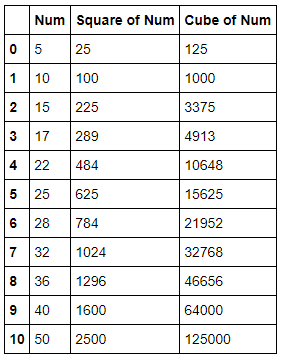
Now, we have to create a function to return multiple values as given below -

Note: df.loc takes two parameters, a list of rows you want to work on — in this case — which means all of them, and a list of columns - [‘Square of Num’, ‘Cube of Num’].

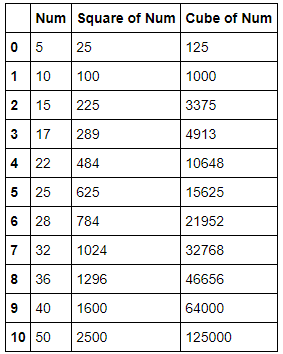
We can call the function directly as given below —

Now, this example shows you, how to update multiple columns inside your dataframe. Keep in mind that if you’re munging data, you should most probably be using pandas because it has far more elegant tools than the pure Python workarounds.


To learn more, please follow us -
http://www.sql-datatools.com

To Learn more, please visit our YouTube channel at —
http://www.youtube.com/c/Sql-datatools

To Learn more, please visit our Instagram account at -
https://www.instagram.com/asp.mukesh/

To Learn more, please visit our twitter account at -
https://twitter.com/macxima


Saturday, October 24, 2020

Python — Finding the index of an item in a list


If you are working as Python developer, data analysts or data scientists for any organisation then it is very important for you to know how to play with Lists and get the requested info such as matching indexes or items from them.

If you want to get all the occurrences and the position of one or more items in a list by using Python then there are many ways but you need a very sufficient way to get the matching items from the list.

Let’s see the below example —

Now, you can see here, we have created a list of fruits and want to get the occurrence of Apple from the list and Python program will store this list as given below -
Image for post
Note — Python is a zero indexed based language

In the above list, you can see that Python based list is starting with 0 index and end with total item-1. In our cases, last index value in our fruit list will be 6–1 =5

Now, this point is How to get the occurrence of a item in the list. You could use a list comprehension with enumerate too such as given below -

Better data munging with pandas — If you have pandas, you can easily get this information with a Series object:

Now, we have converted list into series by using pandas library or package and we will be able to get a comparison check which will return a series of Booleans:

If you try to pass that series of Booleans to the series via subscript notation, and you get just the matching members:

In this case, if you want them in a list or tuple, just pass them to the constructor as given below:

Through For Loop — This is the another options to get the matching items from a given list, only for those coming from another language and may be with a simple loop it’s easier to understand and use it:

If you’re munging data, you should most probably be using pandas because it has far more elegant tools than the pure Python workarounds. Another fact is that, there are many ways to list down the matching indexes from the list but you must have to careful with your code efficiency.
To learn more, please follow us -
To Learn more, please visit our YouTube channel at - 
To Learn more, please visit our Instagram account at -
To Learn more, please visit our twitter account at -
To Learn more, please visit our Medium account at -

Thursday, October 22, 2020

Python- How to Merge two Dictionaries

Python Dictionaries
If you are working as Python developer, data analytics or data scientists for any organisation then it is very important for you to know how to merge two dictionaries.

In Python, Dictionaries are written with curly brackets{}, and they are the combination of keys and values (key: value). The basic use of dictionaries in Python to store data values like a map, which unlike other Data Types that hold only single value as an element. Dictionaries is known as a collection which is unordered, changeable and indexed. If you knows about your keys in dictionaries then you can optimized it to retrieve values in a better ways.

Suppose that you have to add two dictionaries x and y in Python as given below -

By creating a normal function — There is a very simple way to define a function in python by taking two dictionary variables as given below -

Now, you have to call the above function to merge two dictionaries as given below -

Efficient Way :Use lambda functionality — Some Python users think that lambdas are evil because lambda expressions are an odd and unfamiliar syntax to many Python programmers. But Lambdas are closures, which makes the space savings even bigger, since now you don’t have to add a parameterized constructor, fields, assignment code, etc to your replacement class.

You can write the fast and memory-efficient solution with one expression:

As suggested above, using two lines of code or writing a function is probably a better way to go.
To learn more, please follow us -
http://www.sql-datatools.com
To Learn more, please visit our YouTube channel at —
http://www.youtube.com/c/Sql-datatools
To Learn more, please visit our Instagram account at -
https://www.instagram.com/asp.mukesh/
To Learn more, please visit our twitter account at -
https://twitter.com/macxima
To Learn more, please visit our Medium account at -
https://medium.com/@macxima

Friday, October 16, 2020

Python — Retrieve matching rows from two Dataframes

This is the most common requirement to pull the common records from the two dataframes in Python if you are working as a Python developer/data analytics or data scientist for any organisation.

For an example, you have some users data in a dataframe-1 and you have to new users data in a dataframe-2, then you have to find out all the matched records from dataframe-2 and dataframe-1 by using pandas and retrieve matching rows and report to the business for the reason of these records.

So, we are here to show you the logic to get these matched records from two datasets/dataframes in Python.

# pandas library for data manipulation in python
import pandas as pd
#create NaN Values in Pandas DataFrame by numpy
import numpy as np
#creating dataframe-1
df1 = pd.DataFrame({
‘Name’: [‘Ryan’,’Rosy’,’Wills’,’Tom’,’Alice’,’Volter’,’Jay’,’John’,’Ronny’],
‘Age’: [25,26,14,19,22,28,30,32,28],
‘Height’: [189.0,193.0,200.0,155.0,165.0,170.0,172.0,156.0,165.0]})
#creating dataframe-2
df2 = pd.DataFrame({
‘Name’: [‘Ryan’,’Rosy’,’Wills’,’Tom’,’Alice’,np.nan,’Jay’,’John’,’Ronny’],
‘Age’: [25,26,14,0,22,28,30,32,28],
‘Height’: [189.0,np.nan,200.0,155.0,np.nan,170.0,172.0,156.0,165.0]})
Display Values from Dataframe -1 and Dataframe -2 Now, we have populated the both dataframes and these are the below values from dataframes -
Image for post
Verify the datatypes for each column in both dataframes — You have to check the datatypes of your columns and ensure they are the same, as we mentioned here —

# check datatypes for each column
df1 = df1.astype(df2.dtypes.to_dict())

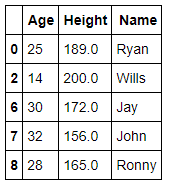
How to pull the matched records? — Now, we have to find out all the matched or common rows from both dataframes by comparing through merge by right_index as given blow-
#matched rows through merge by right_index
commondf=pd.merge(df1,df2, on=[‘Name’,’Age’,’Height’], right_index=True)
#show common records
commondf
Now, you can see this is very easy task to find out the matched records from two dataframes through merge by right_index property.
To learn more, please follow us -
To Learn more, please visit our YouTube channel at - 
To Learn more, please visit our Instagram account at -
To Learn more, please visit our twitter account at -
To Learn more, please visit our Medium account at -