Showing posts with label python extract emails from text file. Show all posts

Friday, October 16, 2020

Python — Retrieve matching rows from two Dataframes

This is the most common requirement to pull the common records from the two dataframes in Python if you are working as a Python developer/data analytics or data scientist for any organisation.

For an example, you have some users data in a dataframe-1 and you have to new users data in a dataframe-2, then you have to find out all the matched records from dataframe-2 and dataframe-1 by using pandas and retrieve matching rows and report to the business for the reason of these records.

So, we are here to show you the logic to get these matched records from two datasets/dataframes in Python.

# pandas library for data manipulation in python
import pandas as pd
#create NaN Values in Pandas DataFrame by numpy
import numpy as np
#creating dataframe-1
df1 = pd.DataFrame({
‘Name’: [‘Ryan’,’Rosy’,’Wills’,’Tom’,’Alice’,’Volter’,’Jay’,’John’,’Ronny’],
‘Age’: [25,26,14,19,22,28,30,32,28],
‘Height’: [189.0,193.0,200.0,155.0,165.0,170.0,172.0,156.0,165.0]})
#creating dataframe-2
df2 = pd.DataFrame({
‘Name’: [‘Ryan’,’Rosy’,’Wills’,’Tom’,’Alice’,np.nan,’Jay’,’John’,’Ronny’],
‘Age’: [25,26,14,0,22,28,30,32,28],
‘Height’: [189.0,np.nan,200.0,155.0,np.nan,170.0,172.0,156.0,165.0]})
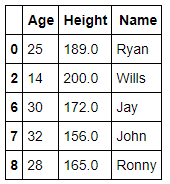
Display Values from Dataframe -1 and Dataframe -2 Now, we have populated the both dataframes and these are the below values from dataframes -
Image for post
Verify the datatypes for each column in both dataframes — You have to check the datatypes of your columns and ensure they are the same, as we mentioned here —

# check datatypes for each column
df1 = df1.astype(df2.dtypes.to_dict())

How to pull the matched records? — Now, we have to find out all the matched or common rows from both dataframes by comparing through merge by right_index as given blow-
#matched rows through merge by right_index
commondf=pd.merge(df1,df2, on=[‘Name’,’Age’,’Height’], right_index=True)
#show common records
commondf
Now, you can see this is very easy task to find out the matched records from two dataframes through merge by right_index property.
To learn more, please follow us -
To Learn more, please visit our YouTube channel at - 
To Learn more, please visit our Instagram account at -
To Learn more, please visit our twitter account at -
To Learn more, please visit our Medium account at -


Saturday, August 29, 2020

Python - Transpose Dataframe Columns into Rows

Today, I was working with Python where I have to transpose some columns into rows to avoid a lot of calculations. As we know that Python has a lot of libraries and very strong communities support. That means, you can solve any problems with your dataset.

Here, I’m using a small dataset to show you that how can we use pandas library to transpose your dataframe.

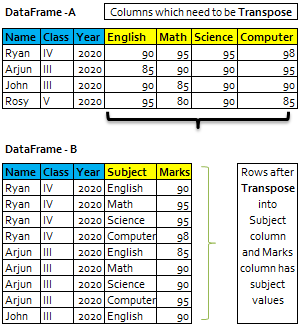
In this example, I’m using class student’s dataset where each student has their subject in the columns with their obtained marks.

Now, we have to transpose subject columns into rows in the ‘Subject’ column and marks will be display in Marks column next to Subject within dataset-2.

Pandas melt() function is used to change the DataFrame format from wide to long. It’s used to create a specific format of the DataFrame object where one or more columns work as identifiers. All the remaining columns are treated as values and unpivoted to the row axis and only two columns — variable and value.

Here, we can see that with the help of Pandas library, we can transpose our dataset into the desired results.


#import Libraries

import pandas as pd

# Creating DataFrame from dict of narray/lists. intialise data of lists

list={'Name':['Ryan','Arjun','john','Rosy'],

     'Class':['IV','III','III','V'],    

     'English':[90,85,90,95],

     'Math':[95,90,85,80],

     'Science':[95,90,90,90],

     'Computer':[98,95,90,85],

     'Year':[2020,2020,2020,2020]}


# Create DataFrame from list/narray

df=pd.DataFrame(list)


#show data in the dataframe

df

======================================================

Name | Class | Year| English | Math |Science |Computer

------------------------------------------------------

Ryan |IV              | 2020 |               90           | 95          | 95     |98

Arjun|III              | 2020 |               85           | 90          | 90     |95

John |III               | 2020 |               90           | 85          | 90     |90

Rosy |V                | 2020 |               95           | 80          | 90     |85

======================================================


# function to unpivot the dataframe

df3=df.melt(['Name','Class','Year'], var_name='Subject')


#show data in the dataframe

df3

=======================================

  |Name | Class | Year|Subject  |value

---------------------------------------

0 |Ryan |  IV   |2020 |Computer| 98

1 |Arjun|  III  |2020 |Computer| 95

2 |john |  III  |2020 |Computer| 90

3 |Rosy |  V    |2020 |Computer| 85

4 |Ryan |  IV   |2020 |English | 90

5 |Arjun|  III  |2020 |English | 85

6 |john |  III  |2020 |English | 90

7 |Rosy |  V    |2020 |English | 95

8 |Ryan |  IV   |2020 |Math    | 95

9 |Arjun|  III  |2020 |Math    | 90

10|john |  III  |2020 |Math    | 85

11|Rosy |  V    |2020 |Math    | 80

12|Ryan |  IV   |2020 |Science | 95

13|Arjun|  III  |2020 |Science | 90

14|john |  III  |2020 |Science | 90

15|Rosy |  V    |2020 |Science | 90

=======================================


#rename value columns to Marks

df3=df3.rename(columns = {'value': 'Marks'}, inplace = False)


#show data in the dataframe

df3

=======================================

  |Name | Class | Year|Subject  |Marks

---------------------------------------

0 |Ryan |  IV   |2020 |Computer| 98

1 |Arjun|  III  |2020 |Computer| 95

2 |john |  III  |2020 |Computer| 90

3 |Rosy |  V    |2020 |Computer| 85

4 |Ryan |  IV   |2020 |English | 90

5 |Arjun|  III  |2020 |English | 85

6 |john |  III  |2020 |English | 90

7 |Rosy |  V    |2020 |English | 95

8 |Ryan |  IV   |2020 |Math    | 95

9 |Arjun|  III  |2020 |Math    | 90

10|john |  III  |2020 |Math    | 85

11|Rosy |  V    |2020 |Math    | 80

12|Ryan |  IV   |2020 |Science | 95

13|Arjun|  III  |2020 |Science | 90

14|john |  III  |2020 |Science | 90

15|Rosy |  V    |2020 |Science | 90

=======================================

 To learn more, please follow us -

http://www.sql-datatools.com

To Learn more, please visit our YouTube channel at - 

http://www.youtube.com/c/Sql-datatools

To Learn more, please visit our Instagram account at -

https://www.instagram.com/asp.mukesh/

To Learn more, please visit our twitter account at -

https://twitter.com/macxima

To Learn more, please visit our Medium account at -

https://medium.com/@macxima

Wednesday, January 8, 2020

Python - Extracting Email Addresses Using Regular Expressions

As a python developers, we have to accomplished a lot of jobs such as data cleansing from a file before processing the other business operations. 

For an example, you have a raw data text file and you have to read some specific data like email addresses by  to performing the actual Regular Expression matching.

What is a Regular Expression and which module is used in Python?
Regular expression is a sequence of special character(s) mainly used to find and replace patterns in a string or file, using a specialized syntax held in a pattern. 
The Python module re provides full support for Perl-like regular expressions in Python. The re module raises the exception re.error if an error occurs while compiling or using a regular expression.
Example -
# Python program to extract emails from the String By Regular Expression.
  
# Importing module required for regular
# expressions
import re 
  
# Example string 
txt = "Ryan has sent an invoice email to john.d@yahoo.com by using his email id ryan.arjun@gmail.com and he also shared a copy to his boss rosy.gray@amazon.co.uk on the cc part."
  
# \w matches any non-whitespace character
# @ for as in the Email
# + for Repeats a character one or more times
findEmail = re.findall(r'[\w\.-]+@[\w\.-]+', txt)  

# Printing findEmail of List
print(findEmail)


Output - 
['john1.d@yahoo.com', 'ryan.arjun@gmail.com', 'rosy.gray@amazon.co.uk']


To learn more, please follow us -

To Learn more, please visit our YouTube channel at - 
To Learn more, please visit our Instagram account at -
To Learn more, please visit our twitter account at -